Count Calories from a Photo — How Close Is AI? (2026)
Count calories from a photo and learn how AI estimates calories and macros, where the values come from, how the image is handled and what you should check.
Download Smaklig – now on the App Store and Google Play The Smaklig app is now on the App Store (iPhone) and Google Play (Android). Download it free.
Download SmakligQuick answer:
- Photograph and review — Google Gemini separates visible parts and estimates calories and macros (protein, carbohydrates and fat) for each serving
- Estimate, not measurement — parts are grounded against Swedish Food Agency data when a match is approved; otherwise the AI estimate remains
- Privacy — Smaklig currently stores no server-based image copy; the image is sent to Google Gemini and a local copy may remain on your phone in the food log
- Allergen warning — best-effort text matching can warn but never blocks; always check for yourself
- Two consents — image analysis requires health consent and saving also requires separate food-logging consent
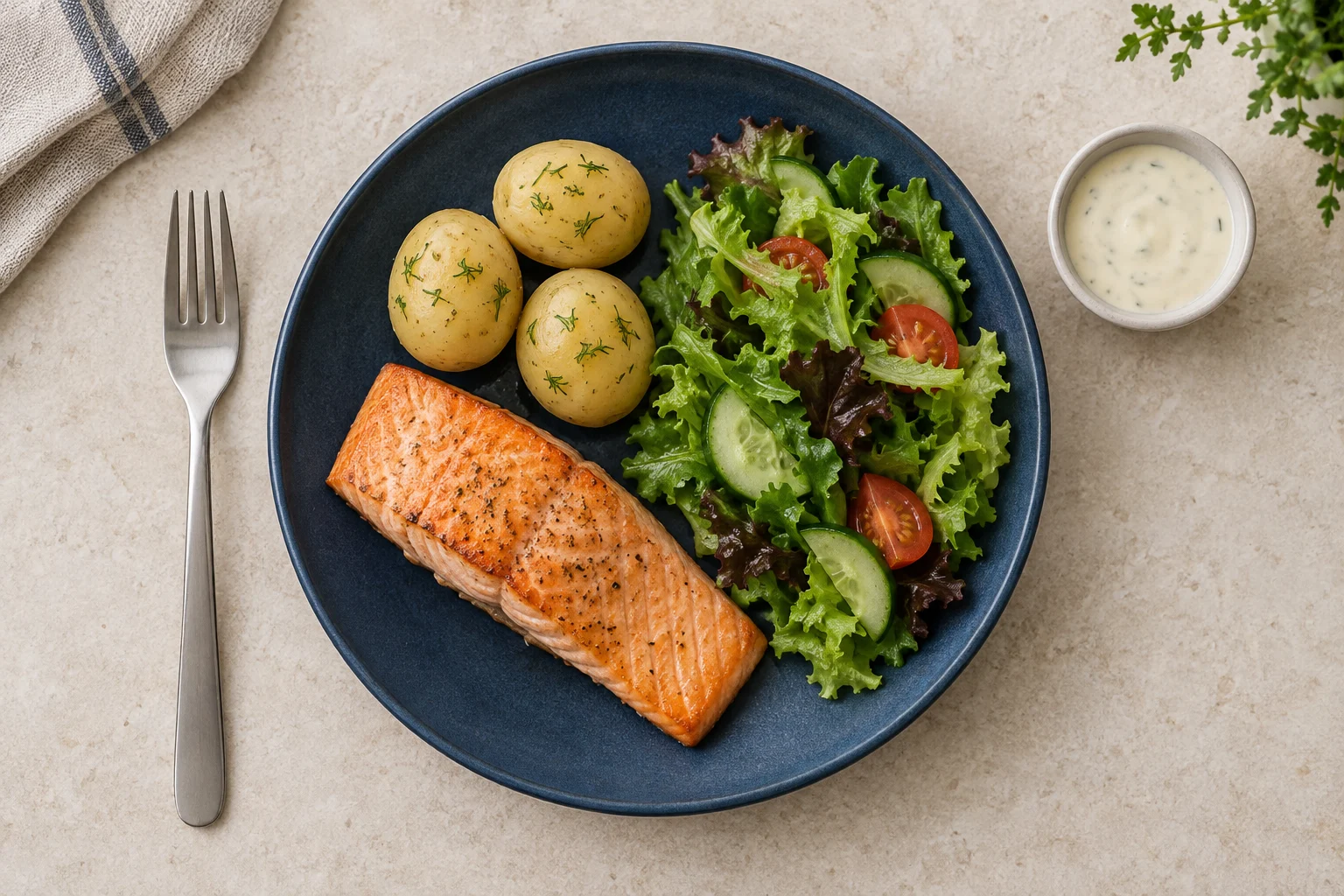
To count calories from a photo, you start with an image of the meal, but the result is a proposal for you to review. Image analysis estimates the visible parts, their serving weights and the meal's calories and macros. You then check the servings, choose the meal and decide whether to save the entry. This can reduce manual input when a plate has several clearly separated parts, but a camera cannot see hidden oil, fillings or food covered by other ingredients.
The division of responsibility matters. Google Gemini produces the first image estimate. Smaklig tries to ground the meal's components against Swedish Food Agency data when a match is approved. You check the serving weights and decide whether the result represents what you ate. The app does not show a confidence or accuracy score, so no such score can replace your review.
How do I count calories by photographing food?#
Photograph the plate, review the proposed components, adjust their serving weights and choose the meal before saving. Image analysis requires active health consent; saving the meal to the log also requires separate food-logging consent. The entry receives today's date according to the device's local time. This flow has no date picker.
Step 1: Take a clear photograph#
Photograph the plate from above in even light and keep the whole meal visible. Where possible, let sauces, sides and other separate parts remain visible. The image is preprocessed on the phone and the app does not request EXIF data. This wording is deliberately cautious: the app does not use an EXIF metadata field in the analysis, but that should not be described as a guarantee about the treatment of every byte in an image file.
Image analysis requires active health consent before the photograph is analysed. This is a distinct condition for processing health-related information. Giving that consent does not automatically save the meal in the food log.
Step 2: Check components and servings#
The AI proposes visible components, serving weights, calories and macros. You can edit the serving weight for each existing component, and calories, protein, carbohydrate and fat scale with the serving. Pay particular attention to oil, dressing, sauce and ingredients that may be hidden or mixed together.
You cannot add or remove components during the review step. If the proposed breakdown does not represent the meal, you therefore need to decide whether the result is still useful before saving it. The flow should not be interpreted as making a difficult plate reliable merely because it displays several numbers.
Step 3: Choose the meal and save#
Choose breakfast, lunch, dinner or snack. Saving requires separate food-logging consent in addition to the health consent used for image analysis. The meal is logged on today's date according to the phone's local time, with no option to choose another date in this flow.
If you need to identify a packaged item instead, you can scan its barcode and log nutrition. That flow reads a numeric code and does not use a meal photograph. To start with ingredients already at home, read how to photograph your fridge for dinner ideas.
How accurate is the AI calorie estimate?#
Calories from a photograph are an estimate, not a measurement. A systematic review of AI-based dietary assessment from images reported calorie errors of 0.10–38.3% against ground truth, with poorer performance for complex foods (Shonkoff et al., 2023, Annals of Medicine). The range describes the studies in the review, not a promised error margin for every photograph or for Smaklig.
Three sources of uncertainty matter in particular:
- Serving size: a photograph has no scale reading, and perspective can distort volume.
- Hidden ingredients: oil, butter, fillings and sauce can add energy without being clearly visible.
- Complex dishes: stews, casseroles, soups and mixed bowls are harder to divide visually than separated parts.
The app does not display a confidence or accuracy score. The practical check is therefore to read the component names and check their serving weights. If you know that the rice weighed 180 grams or that the dressing contained a particular amount of oil, compare that information with the proposal. If several parts are misidentified, do not treat the total as reliable ground truth.
Weighed amounts and declared nutrition values normally provide a better basis because they reduce uncertainty about identity and serving. Even then, the amount you actually ate must be correct. A photograph is most useful when quick logging and a consistent method matter more than reconstructing every detail of a recipe.
Where do the calories and macros come from?#
Google Gemini first estimates the meal's components and servings; Smaklig then matches each item against Swedish Food Agency data. An item whose name matches and passes the safety checks uses that grounding. An item that is not matched, or whose match is rejected, retains the AI estimate — separability is not what decides it.
The Swedish Food Composition Database contains nutrition values for generic foods. It can provide a stable basis for an identified component such as boiled potato or salmon when the match is approved. The database does not automatically know the recipe behind a mixed stew, the amount of cooking fat in the pan or which part of a meal is hidden.
| Part of the process | Source | What you need to check |
|---|---|---|
| Image interpretation | Google Gemini | that the components represent the food on the plate |
| Proposed servings | AI estimate | the serving weight for every displayed component |
| Approved component match | Swedish Food Agency | that the generic food represents the actual food |
| Unmatched or rejected part | AI estimate | that the uncertainty suits your purpose |
Macros means protein, carbohydrate and fat. Energy and macros are connected, but one total does not describe all the meal's nutrition or what you need during a day. The Nordic Nutrition Recommendations 2023 place energy within a wider nutrition context and provide group references, not ground truth for your photographed plate.
What happens to the image after analysis?#
Smaklig currently stores no server-based image copy. The image is sent to Google Gemini for analysis. After logging, the app may retain a local copy on the phone for the food log's image history; saving to the gallery only happens if you choose it. This distinguishes server storage, transfer to the analysis provider, local history and an optional gallery choice.
The image's contents also matter. Photograph the plate without people, mail, medicines or other private details in the background. Crop to the food if necessary. The image is preprocessed on the phone and the app does not request EXIF data, but the image content itself is still sent to Google Gemini for analysis.
The local copy belongs to the food log's image history after you log the meal. It is not a server-based image copy. If you choose to save the image to the phone's gallery, that is a separate choice. Read Smaklig's privacy policy for the complete description of personal-data processing.
Does the app warn about allergens?#
The app can warn about possible allergens, but the check is best effort and never blocks logging. It performs deterministic text matching against component names. The match can miss an allergen that is not evident from a name and can overflag words that require interpretation. The app can warn about possible allergens, but it is not a guarantee — always check for yourself.
A photograph rarely shows complete ingredient information. A sauce may contain milk, mustard or nuts without this being visible, and cross-contamination cannot be determined from an image. Read packages and recipes and ask the person who prepared the food when needed. A visible warning means that you should investigate the match; no warning does not mean the meal is free from allergens.
The allergen check does not change the logging flow. You can log a meal even when a possible match is displayed, and the app makes no medical decision for you. The warning is an extra prompt to pay attention, not a safety boundary.
How should I use the estimate?#
Check the serving weights, use the same method over time and treat individual entries as uncertain data points. The food log can show how an estimated meal affects today's overview, but the values are not a judgement about the food or you. A single meal or photo estimate is not guilt, not permission to eat and not something to exercise away.
Start with the parts you actually know. If you weighed the potatoes but not the sauce, correct the potato serving and keep the sauce's uncertainty in mind. Do not try to compensate for an uncertain estimate by changing later meals or activity. Across several days, a consistent and understandable method is more useful than reacting strongly to one total.
If your goal uses an energy-needs estimate, read how TDEE and macros are estimated. For weight goals, the guide to calorie deficits and individual variation explains why long-term structure and safety boundaries matter more than one meal. Core terms are also defined in the meal-planning and nutrition glossary.
A simple check before saving is:
- Do the displayed components match what you ate?
- Are the serving weights reasonable based on what you know or weighed?
- Is there oil, sauce, filling or anything else that the image may have missed?
- Have you checked ingredients and allergens for yourself?
- Is the correct meal selected, and do you want to log it on today's local date?
When something important is wrong, you can choose not to save. When the proposal is useful, you can log it with its uncertainty visible and follow patterns over time. It is a practical food-diary aid, not a medical assessment.
Smaklig is an AI-based meal-planning tool for the Swedish market. A meal photograph produces an estimate for you to review before any logging.
Sources
- Livsmedelsverket. Swedish Food Composition Database — search nutrition
- Nordic Council of Ministers (NNR). Nordic Nutrition Recommendations 2023 — Energy
- Annals of Medicine (Shonkoff et al., 2023). AI-based digital image dietary assessment methods compared to humans and ground truth: a systematic review
Frequently asked questions
How do I count calories by photographing food?
Photograph the plate so the AI can divide visible food into components and estimate calories and macros. Check the serving weights, choose the meal and save. Image analysis requires active health consent; saving the meal to the log also requires separate food-logging consent.
How accurate is the AI calorie estimate?
It is an estimate, not a measurement. A 2023 systematic review in Annals of Medicine found calorie errors of 0.10–38.3% for AI image analysis against ground truth, with poorer results for complex foods. The range is the average overall relative errors in the included studies and could not be pooled into a single estimate because the studies varied. Hidden oil, obscured ingredients and serving size all matter, so check the serving weights.
Where do the values come from?
Image analysis with Google Gemini estimates calories and macros and returns items (which may be a whole dish or separate components). Each item is matched against the Swedish Food Composition Database: items whose name matches and passes the safety checks are grounded there, while unmatched or rejected items keep the AI estimate.
What happens to the image?
Smaklig currently stores no server-based image copy. The image is sent to Google Gemini for analysis. After logging, the app may retain a local copy on the phone for the food log's image history; saving to the gallery only happens if you choose it.
Does the app warn about allergens?
The app can warn about possible allergens through best-effort text matching against component names, but the warning never blocks logging and may both miss and overflag. It is not a guarantee — always check for yourself.
Can I rely on the values for weight management?
Use the values as an estimate and follow patterns over time, not as ground truth for one meal. Weighed amounts and declared nutrition values normally provide a better basis, but you still need to check the serving. A single meal is neither guilt nor something to exercise away.
Want more meal planning tips?
More guides on food, health and saving money — and a sous-chef that plans your week for you.
Get started
Founder, Smaklig
Writer at Smaklig. We write about food, health, and how to eat better without breaking the bank.
Related articles
September 4, 2026 · 13 min
Scan a barcode and log food in seconds (2026)
Scan a barcode and log food with nutrition data from Coop's catalogue. See how servings, consent, privacy and products without a match are handled.
Read moreAugust 1, 2026 · 14 min
MyFitnessPal vs Lifesum: Free & Premium Features (2026)
MyFitnessPal or Lifesum? Compare Free and Premium features, pricing, food logging and Smaklig to choose the right everyday tracker for your goals today.
Read moreApril 12, 2026 · 15 min
TDEE Calculator and Macros: Complete Guide (2026)
How to calculate TDEE (calories), BMR and macros using the Mifflin-St Jeor formula. Worked examples for 5 profiles, activity table and how to adjust by goal.
Read moreReady to plan smarter?
Smaklig creates your weekly menu with AI based on store campaigns. Tailored to your goals and allergies.
Get started free